Showing posts with label Cool gadgets. Show all posts

Friday, February 22, 2013

Cool GADGET- 'DoorBot' lets homeowners answer the door from anywhere !!

DoorBot gives buyers a door device and a smartphone/tablet app to let them control who gets in their house from wherever they please. (Photo: Edison Junior)
           
Homeowners can soon answer the door and even unlock it for visitors simply by checking their smartphone or tablet. A "DoorBot" designed for answering the door remotely has successfully hit its $250,000 funding goal on a new crowd-funding website.
 
The $189 invention, from the company Edison Junior, allows people to see and communicate with visitors without being at home — a feature that has attracted $282,000 in funding so far. A special $339 bundle that includes a separate "Lockitron" device, from the company Apigy, adds the ability to remotely unlock the door and share virtual keys with friends and family through a downloadable DoorBot app for smartphones and tablets.
 
"Mechanically, Lockitron is a very simple device in that it just turns the lock, but its brains are actually pretty powerful in that it can communicate locally with your phone as well as over the Web," said Cameron Robertson, a co-founder of Apigy.
 
The announcement of DoorBot's funding success on Christie Street — a new rival of Kickstarter focused on hardware — came on January 24th.  But Robertson previously spoke with TechNewsDaily during the Consumer Electronics Showcase in Las Vegas in January.
 
Lockitron and DoorBot offer homeowners a new level of control over access to their home from their mobile devices, Robertson explained. Landlords can issue virtual keys to tenants. A homeowner at work could remotely unlock the door after talking with the deliveryman outside, or simply take his or her  smartphone on a jog and leave the keys at home.
 
Best yet...if your DoorBot is stolen, they will replace it for free!!  How's that for customer service. 

Thursday, February 14, 2013

COOL GADGET!! - Take awesome photos with the Olloclip for your iPhone.


Olloclip Is The Only iPhone Lens You’ll Ever Need [Review]
When I bought my first iPhone last month, there was one accessory I knew I wanted – the Olloclip lens.

I have been playing with this review unit for a couple weeks now and it’s just as great as I expected, although there are one or two things I don’t like. Let’s take a look…

Olloclip Is The Only iPhone Lens You’ll Ever Need [Review]

The Olloclip is actually three lenses, all contained in a little clip which slips over the corner of your iPhone and puts one of those lenses in front of the camera. You get a fisheye and a wide-angle, and if you unscrew the wide-angle there’s a macro lens underneath.

Both main lenses have their ow plastic caps, and you can keep the Olloclip in your pocket or in the little fabric bag which comes with it.

The Good

The reason the iPhone is the most popular camera, like, ever is that it’s always ready to use. And now, with the slide-to-shoot shortcut on the home screen, it’s even faster. So any accessory has to be eqaully quick to deploy.

And speed is where the Olloclip shines. I ditched the little drawstring bag for a Velcro-backed pouch that came with one of my camera bags, so I can keep the Olloclip permanently to hand just inside my murse. I just grab it, slide it onto the corner of the iPhone, pop off the lens cap and I’m shooting.

Olloclip Is The Only iPhone Lens You’ll Ever Need [Review]

Compare this to sticking magnetic rings onto your iPhone and struggling with individual lenses and the difference is huge. The Olloclip automatically lines up with the iPhone’s camera thanks to its design, and switching sides is as easy as whipping it off, turning it around, pausing for a second in confusion and sliding it back on.

The results are also good – if you remember you’re adding cheap glass to the front of the iPhone’s carefully-crafted lens, that is.

And finally, for shooting video the Olloclip is all but essential. The video app crops in on the center of the camera’s sensor, presumably to allow for the iPhone 5’s great image stabilization. But this means that you’er often way too close to your subject. Clip on the Olloclip’s wide lenses and things open back up again.

The Bad

There’s not much not to like. The tight grip of the clip on the iPhone makes me think that it’ll scratch the iPhone’s lens as it slides on and off, but that fear appears to be unfounded.

The lens caps are also a little annoying: easy to lose, easy to knock off in a pocket and tiny. To be fair, this is a problem with all lens caps ever. I solve the problem with my little yellow pouch, which lets me keep the lens safe, and without the lens caps: I just don’t bother with them.

And that’s it. Like I said, this thing is almost perfect. No, it doesn’t have a telephoto lens. And no, it doesn’t work with a case, but that’s what design is about – compromise. And the folks at Olloclip made some smart decisions when designing this little dongle.

The Verdict

If you’re a fan of the previous iPhone 4/S Olloclip, you’ll be familiar with this one. It does the same thing in a slightly slimmer package.

If you’re looking to buy a new lens for your new iPhone, this should be at the top of your list unless a) you always use a case or b) you need a telephoto lens. If so, there are other options (including a case with a removable telephoto lens!) which you should research.

Is the Olloclip worth the $70 asking price? If you’re in the market for an accessory lens, then the answer is “hell yes.”

Sunday, February 10, 2013

COOL GADGET!! Stick-N-Find

So are you like me and always misplacing your car keys or phone throughout your day? If you suffer from this affliction, you may want to take a look at the Stick-N-Find Bluetooth-powered ultra small location stickers from a start up project on the indiegogo web site.


The Stick-N-Find location stickers are about the size and thickness of a quarter .  You stick them to your items that you can track via an app on your Apple iOS or Android device. The Stick-N-Find not only allows you to track it by Bluetooth, but it also has a built-in buzzer and light to allow you to hear and see the item you are looking for, even at night. The range on the Stick-N-Find is approximately 100 feet, and the battery should last for a year.


The Stick-N-Find software packages offer some unique and useful features, such as the “radar screen” that will help you find your lost item. The “leash” feature allows you to set an alert if an your tagged item is beyond a proximity distance set by you. The “find it” feature lets you know when a missing item is in range of the device you are using to track it. The software for the Stick-N-Find will allow you to track up to 20 devices at one time, but it is limited to the Bluetooth 4.0 standard.

Friday, February 8, 2013

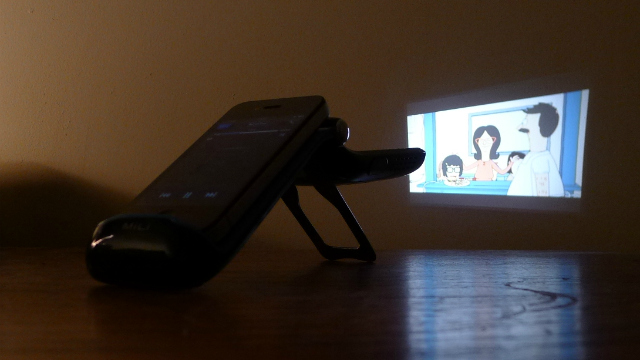
HOW TO: Make a Mini Movie Theater With Your iPhone


Product: MiLi Power Projector 2 pico projector

Price: $399.95

What It's Good For: Portability, easy set up and decent picture quality.

Who It’s Good For: Anyone who wants to share his iPhone's video content with a group or see it larger.

Limitations: It's not a cheap gadget.

Bottom Line: The MiLi Power Projector 2 offers iPhone owners a fun way to watch and share video.


A Look at the MiLi Power Projector 2

The second-gen MiLi Power Projector boasts a few improvements on the first. It has shed a good few inches of bulk, boasts better 2.5-hour battery life and now has a fanless design for near-silent operation. Offering a fun way to view video content larger and with a group of others, we were interested to test it out.

Setting up the projector is easy. Once you've charged it via mini USB, just open it, pop out the stand, stick your iPhone on the built-in Apple dock, and it recognizes the input right away. You can tweak brightness and contrast in the menu using the remote control, while the volume control and the focus wheel are on the projector itself.

MiLi claims a projection area of up to 70- inches, but you do have to consider that the further away the projector is from the wall, the less bright the image will be. We found a sweet spot of size and brightness to be around 40 inches, which is obviously much larger than the iPhone's display and a decent size to watch a movie.

In a dark room, the image quality was good. The projector only boasts a VGA resolution, so you're not going to see the nuances and details you might be used to on your big screen TV, but it's not a replacement for that — it's a fun and very portable way to share video from your iPhone or iPOD touch.

We feel the pico projector's novelty value doesn't necessarily outweigh the high cost, but we were impressed with the gadget and can recommend it to anyone who can afford to splash out.

Thursday, January 31, 2013

NEW GADGET!! - Ice Cubes that will tell you when you are drunk!

Responsible drinking is often seen as an oxymoron. Once you’ve had one too many drinks, you’re often not responsible enough to know when to stop. A student over at MIT is trying to solve this not-so-little problem by creating smart ice cubes that warn you when you’ve had one too many and will even notify a friend if you go past the point of no return.


Gizmag reports that Dhairya Dand, the MIT student who invented these light-up cubes, got the idea after experiencing a bad night of his own. During a party at MIT one night, he remembers having three drinks around midnight. Seven hours later, Dand woke up in a hospital without any memory of how he got there or what happened to him. While others would have simply vowed to never let that happen to them again, this young student did something about it by creating smart ice cubes to indicate when he needs to slow down.

Each cube comes equipped with an LED light, an accelerometer, an IR transceiver, and a battery. As you tilt back your cup for a drink, these little devices incased in a watertight and non-toxic jelly keep track of your sips and how long you go between each sip. The lights move from green to red as you drink throughout the night. If you don’t stop after the red light turns on, the cube will send a signal to your mobile device to text a friend to come pick you up. Nothing that small has ever been so responsible.

As an added features, the lights dance to the ambient music in the background. Imagine moving around a room with your own techno beat in a cup.

Right now, the prototypes only turn to red after you have three drinks within a 30-minute period. If this idea ever hits the market, the cubes would need to be smart enough to program in such factors as the weight of the person drinking or their particular tolerance. Until then, you can check out a video to see the cubes in action.

Friday, January 25, 2013

Intresting gadget!! - Introducing "Le Whaf"

Le Whaf

In a trend that has slowly been gaining steam over the years, new devices are able to deliver flavored vapor as a substitute for food or beverages. Sometimes advertised as a dietary aid, and sometimes replacing an energy drink as a shot of energy vapor, the “food mist” of the past hasn’t usually been very customizable. Now, with a kitchen gadget called the “Le Whaf”, the flavors of entire meals can be turned into vapor and then inhaled through a straw.

The contraption can waft either alcohol and other liquids, as well as meal substitutes. Wafting alcohol is simple enough — dump some alcohol into the wafting chamber, then turn the machine on. The same goes for wafting meals, but you have to buy special liquidized mixes for that. People that have used Le Whaf like to mention that the unit doesn’t really generate calories, because — you know — you’re not actually eating anything.

Billy Mays pitching vapor

David Edwards and Marc Bretillot, designers of Le Whaf, have actually put some interesting technology into the unit. Piezoelectric crystals sit at the base of Le Whaf, and when the liquid inside is at a specific level, they begin to vibrate. This vibration generates ultrasound waves, which cause the liquid to bubble and turn into vapor. Once the mist is created, Le Whaf can “pour” it into a glass, where it floats in the air for a minute or so before it sinks to the bottom.

Any liquid will work with the gadget, and the designers suggest trying out different homemade soups and juices. However, because Le Whaf only generates vapor, it’s obviously not a substitute for food, but rather serves a purpose similar to chewing gum. Also, it would be pretty fun to walk into a room, see an opaque mist, and just start tasting a steak.

Le Whaf has supposedly been a big hit in Europe, and the creators are hoping to bring it stateside sometime soon. If you’ve tried it, or any other food vapor products — such as those Vaportrim sticks or the Aeroshot energy inhalers — we’d love to know if they left you satiated in any way.